
Learn accounting software by doing.
Free, guided practice for students and teachers. Run a fictional company’s books, solve bookkeeping cases and print a progress report for your instructor.
Free to use · no account or sign-up · opens in a new tab
- 14
- guided topics
- 7
- case practices
- TZ
- VAT, WHT and PAYE
- progress report
Practise on this page
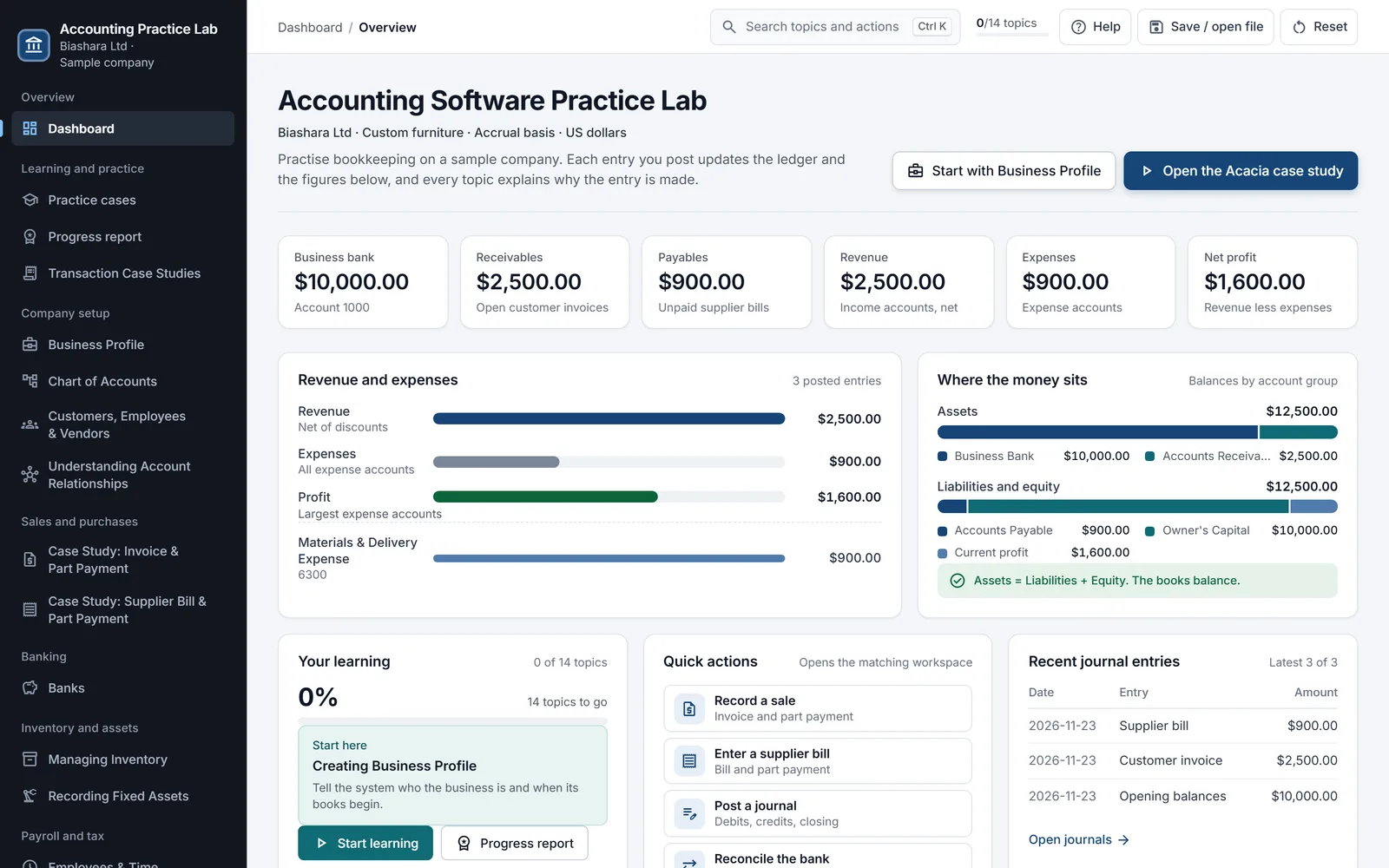
Work through the guided topics or the sample company below. Changes last for this open session; use Save / open file in the lab to keep your books.
What you can practise
Fourteen guided topics take you through a bookkeeping cycle in a practice company. Each ends with a practice task and a quick check, and completed topics appear in your progress report.
Start topic 1 (opens in a new tab)- Creating a business profile
- Configuring the chart of accounts
- Understanding account relationships
- Creating customers, employees and vendors
- Configuring banks
- Customer invoice and part payment
- Supplier bill and part payment
- Transaction case studies
- Managing inventory
- Recording fixed assets
- Employees and time
- Tanzania tax setup and compliance (VAT, withholding tax, PAYE)
- Journals and period closing
- Generating reports
Accounting case practices
Seven short cases, each with a few activities: record the entry, answer a quick check and see what the system posted.
Cash book: discounts and bank transfer
Record settlement discounts and a transfer between cash and bank.
Bank reconciliation
Separate timing differences from missing entries and reach the adjusted balance.
Correcting errors and clearing suspense
Post correcting journals and clear a suspense account.
Inventory, cost of sales and value
Work out cost of sales, gross profit and closing stock value.
Depreciation and disposal of equipment
Calculate depreciation and the gain or loss on disposal.
Accruals, prepayments and net profit
Adjust period-end income and expenses before reporting profit.
Internal controls: split supplier duties
Assign supplier tasks so no one person controls the whole payment.
On your own or in class
From first setup to financial statements.
- 01
Set up the books
Create the fictional company profile, opening balances, and a chart of accounts.
- 02
Record business activity
Practice invoices, bills, payments, inventory, owner funds, fixed assets, and journals.
- 03
Check and explain
Reconcile the bank and follow posted entries into the general ledger and financial reports.
Biashara Ltd invoices Acacia Corp for $2,500.
| Account | Debit | Credit |
|---|---|---|
| Accounts receivable | $2,500 | — |
| Sales income | — | $2,500 |
| Journal totals | $2,500 | $2,500 |
Balanced: the customer owes the business; cash has not arrived yet.
For teachers: students prepare a progress report in the lab and print it or save it as a PDF to hand in. There are no accounts, classes or online grading. Reset Session returns the sample books to their starting state; completed markers stay on the device until reset, and names entered for a report are not saved.
Questions about the practice lab
Is the accounting practice lab free?
Yes. It is free to use in a web browser, with no account, sign-up or download.
What can I practice?
Business setup, the chart of accounts, customers and suppliers, invoices, bills, payments, banking and bank reconciliation, inventory, fixed assets and depreciation, payroll, journals, period closing, financial reports including a statement of cash flows, Tanzania tax setup and compliance, plus seven accounting case practices.
Does it cover Tanzania tax?
Yes. A practice topic covers VAT registration and returns, withholding tax, PAYE, SDL, WCF and NSSF, and a filing calendar. The practice company can also be set to Tanzanian shillings and VAT registration, so invoices, bills and credit notes post 18% VAT, and statutory payroll posts PAYE, NSSF, SDL and WCF to their own liabilities. Everything uses published rates with a fictional company. It is for learning, not tax advice; check current Tanzania Revenue Authority guidance.
Is my progress saved?
Completed topics and cases are remembered on your device until you reset them. Use Save / open file inside the lab to download your practice books and continue later.
How do teachers see student work?
Students prepare a progress report in the lab and print it or save it as a PDF to hand in. The lab has no class roster, online grading or student accounts.
Is this real accounting software?
No. It is an independent learning simulator that uses a fictional company and illustrative amounts. It is not affiliated with any accounting software vendor and must not be used for real business records.
Ready to practise?
The lab opens in its own tab with your progress kept on this device.
A practice environment, not production accounting software.
The examples use a fictional business and illustrative amounts. Tax rules, payroll obligations, account names and accounting conventions vary by country and course. Use this lab to learn general software workflows; do not use it to keep real business books or as tax, payroll or accounting advice.
Privacy and advertising settings
This practice lab uses EkkySoft’s site-wide advertising integration and consent controls. Ad availability depends on Google’s account review and settings.