
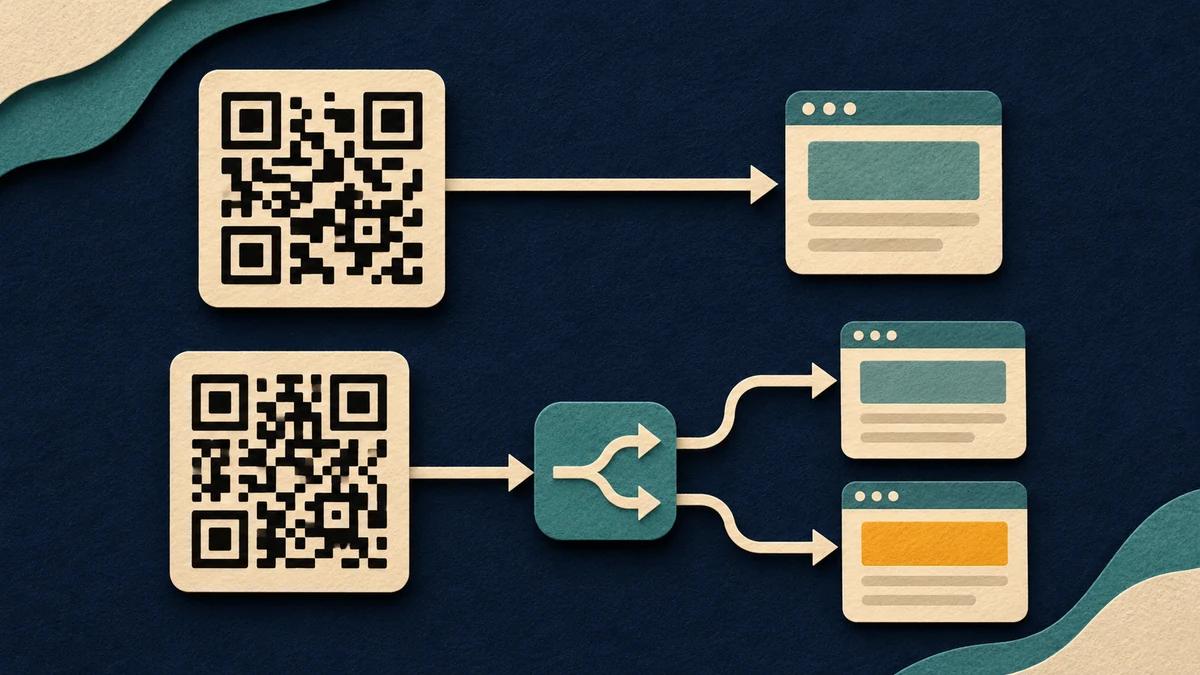
A QR code does not become editable just because it is printed on a poster, menu, or package. The key question is what the pattern contains. A direct QR code contains the destination or other data you entered. The QR Code specification overview describes the symbol and the data it can encode; what happens after a URL is opened depends on the website and any redirect service behind it. A product called a dynamic QR code usually contains a short address managed by a service, which then redirects the scan to a destination the service can change.
“Static” and “dynamic” describe common product approaches. They are not two different QR Code symbologies in the QR standard. The QR symbol carries encoded data; whether a redirect service sits behind that data is an application choice.
Static: the final data is in the pattern
For a website QR code, a static code encodes the website address itself. For a Wi-Fi code, it encodes the network fields. After you download and share it, changing a webpage or password does not change the printed pattern. If the encoded information becomes wrong, you need a new code and must replace the old copies.
This direct approach can be a good fit when the destination is stable and you want fewer service dependencies. A printed code linking directly to a current opening-hours page, for example, does not need a third-party redirect to reach that page.
A static code is not a guarantee that the destination will remain online. The encoded website can move or disappear, and a network password can change. The QR pattern is fixed; the destination it names can still change independently.
“Dynamic”: a service can control a redirect
In a common managed setup, the QR pattern encodes a short URL on a provider's domain. When someone scans it, that address redirects to another URL. If the provider lets you edit the destination, the printed QR can keep pointing to the same short URL while the redirect target changes.
That flexibility adds dependencies. The short URL must continue resolving, the provider must keep the redirect active, and the account or plan may determine whether editing or scan reporting remains available. Check the provider’s current terms, export options, domain control, privacy policy, and what happens if you stop paying before printing a large run.
The redirect provider can observe requests to its short URL. That does not mean every service records the same details or uses them in the same way; inspect the provider's documentation and privacy terms. A direct code also does not prevent the destination website from collecting its own visit data.
A quick choice
| Choose a direct/static code when… | Consider a managed redirect when… |
|---|---|
| The destination is stable or easy to replace in future prints. | You need to change a destination after copies are already distributed. |
| You want to avoid a QR-specific account or redirect dependency. | You need one short printed link that can route to a changing campaign page. |
| You do not need scan counts from a QR provider. | The provider’s current reporting is necessary and acceptable for your privacy needs. |
| You can test the final destination before sharing. | You have checked provider continuity, pricing, access and exit terms. |
Neither column is automatically more secure or more reliable. The right choice depends on what is encoded, who controls the destination, and what happens if a service changes.
Before you print
- Open the exact destination. Check spelling, HTTPS, page ownership and mobile behavior. A QR code does not verify that a link is trustworthy.
- Scan the downloaded file. Confirm that it opens the intended page or action. Do not rely only on the preview.
- Test a paper copy at final size. A screen preview cannot show how the printer, surface, glare, contrast or viewing distance will affect scanning.
- Keep a replacement plan. Store the source details and artwork. For direct codes, document where a replacement is needed if the destination changes. For managed redirects, retain account access and a copy of the current target.
- Treat sensitive payloads as visible. Contact details and Wi-Fi credentials encoded in a static code can be read by compatible scanners. Share the image as carefully as you would share its contents.
If a fixed destination is what you need, EkkySoft’s QR Code Generator creates static codes for web links and other common payloads. Its codes do not use an EkkySoft redirect or scan counter. That also means the tool cannot edit a code after you have distributed it.
Bottom line
Choose based on the control path, not on the word “dynamic.” A direct code is simpler when its data will stay useful. A managed redirect can make a printed destination changeable, but introduces a provider whose availability, account terms and data handling matter. In either case, scan and test the actual printed code before a large run.